The bottom line on last month’s agent bill didn’t shock me. What stopped me was that I couldn’t say what a single line of it paid for.
The industry’s favorite new productivity metric is tokens burned. Jensen Huang says engineers should be using a serious amount of AI to stay competitive, and honestly, he’s right that coding without it now feels like designing chips with paper and pencil. Somewhere along the way, “use more AI” turned into “spend more tokens,” and those are not the same sentence. I did the unfashionable thing and checked the receipt.
A month of heavy agent use, itemized, taught me four things that probably apply to you too.
Lesson 1: tokens are not code
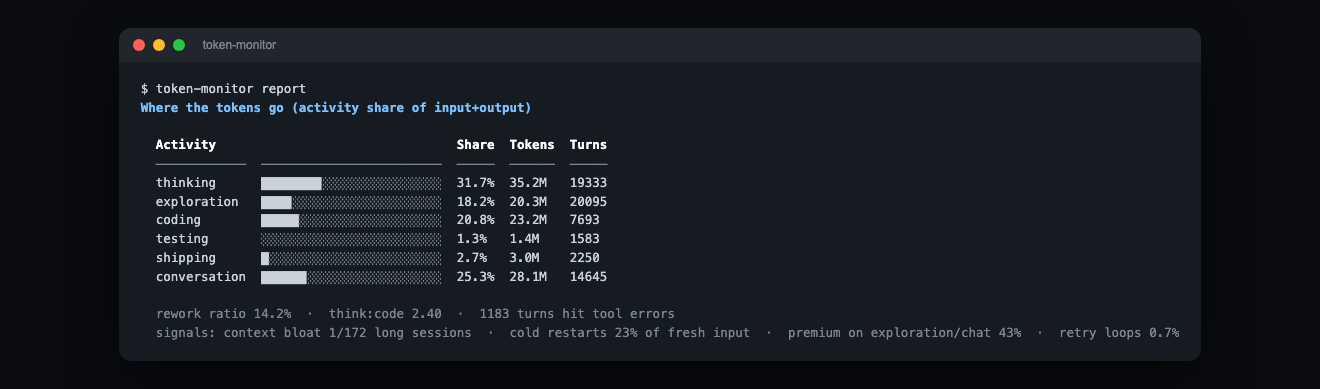
This breaks every turn down by what it was for, and reading it back got awkward: only ~21% of my tokens actually wrote code. The rest went to thinking, conversation, and reading files.
None of it is wasted, and exploration and planning are real work. Still, if you picture your AI spend as “writing software,” it’s closer to a brilliant consultant who reads a lot and occasionally types. Worth knowing before you decide every token is essential.
Lesson 2: you’re probably overpaying a genius to do an intern’s job
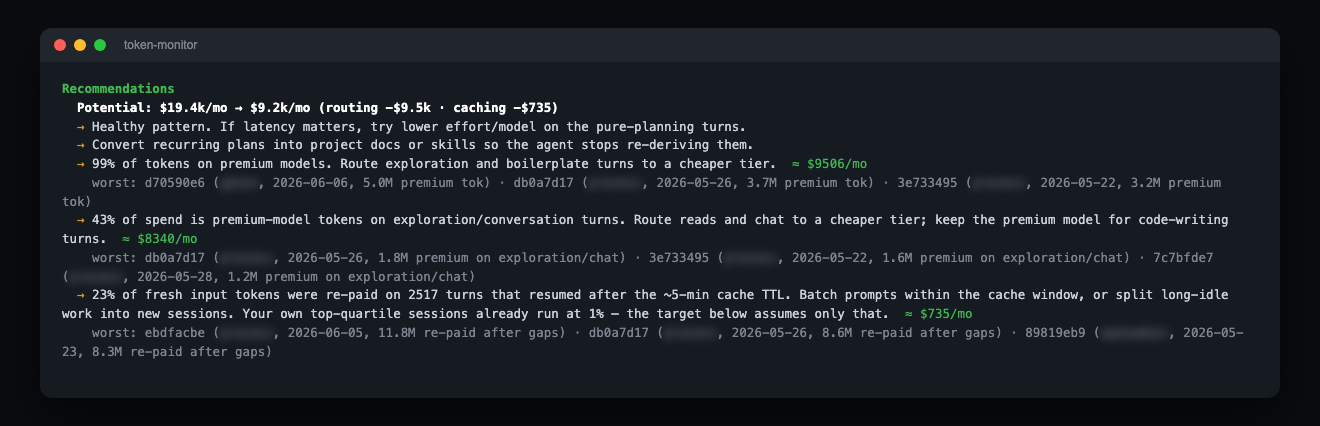
The recommendations came back blunt. 43% of spend was a top-tier model doing exploration and chit-chat. Work a model a fifth the price handles fine. Route the cheap stuff to a cheap model, keep the expensive model for the hard parts, and the bill roughly halves with zero change to output.
The lever I had overlooked was timing. The prompt cache expires in ~5 minutes. Step away longer than that and your next message re-pays for the entire context at full price. Every coffee break cost me a fresh copy of a context I had already bought. Batch your prompts, keep sessions warm. It’s free money.
Lesson 3: marathons are where money goes to die
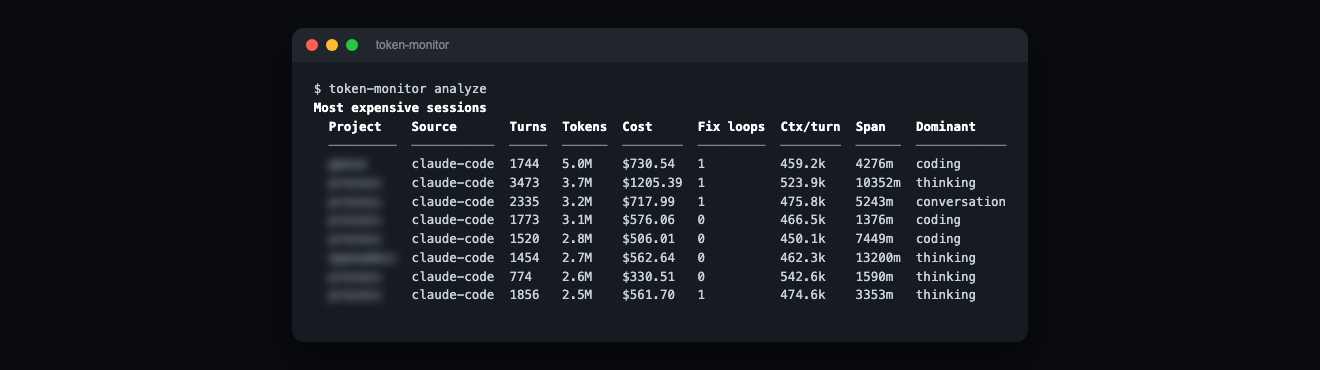
One session ran 3,473 turns and cost over $1,200 by itself. Long agent sessions balloon on their own: the context grows, every turn re-pays for it, and you stop noticing. Splitting work at natural task boundaries is the single cheapest habit you can adopt.
Lesson 4: measure what tokens buy, not how many you burn
I built a tiny tool for exactly this. token-monitor reads the logs your coding agents (Claude Code, Gemini CLI, Codex, Cursor, Copilot…) already write to disk and tells you what your tokens actually bought: what’s planning vs. coding, what’s overpriced, what’s getting better or worse over time. Local, zero dependencies, no API keys, nothing leaves your machine.
npx @ryandemelo/token-monitor collect
npx @ryandemelo/token-monitor report --trend
Or grab Token Monitor in the VS Code / Cursor marketplace.
I made it because a few people kept asking me the same thing: big bill, no clue what it bought. It’s a fair question. The paper-and-pencil days are over, so I keep spending the tokens and glance at the receipt now and then. Tokens are a cost, not a scoreboard.
⭐ github.com/ryandemelo/token-monitor, MIT licensed. PRs welcome, especially adapters for Aider / OpenCode / Windsurf.
Screenshots are real usage with project names blurred.